Photon Solana Trading Platform: The Complete Guide for Meme Coin Traders in 2026
If you trade meme coins on Solana, execution speed is the difference between getting in at launch price and buying the top after everyone else already profited. Photon Solana trading platform solves that problem with a web-based interface built for sub-second trade execution, real-time token discovery, and security filters that flag rugs before you are already in one.
This guide covers everything: what Photon is, how to set it up in under five minutes, how to trade safely, what it costs, and how it compares to every major alternative in 2026.
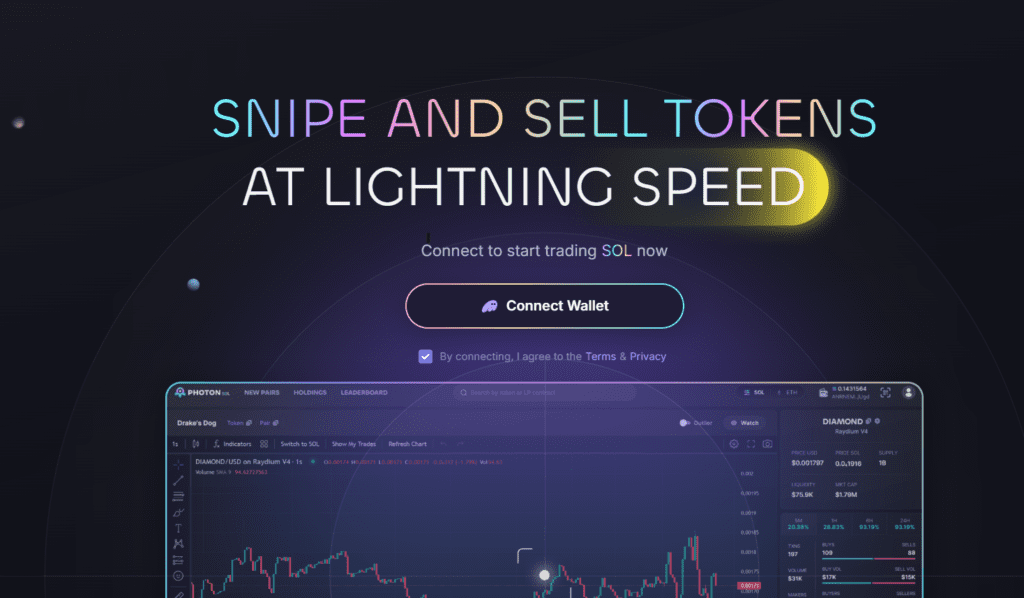
Source: photon-sol.tinyastro.io
What Is the Photon Solana Trading Platform?
Photon is a fast, web-based Solana trading platform designed specifically for manual trading of tokens and meme coins across Solana DEXs, including Raydium, Jupiter, and Pump.fun. Unlike Telegram-based bots such as BonkBot or Trojan, Photon runs entirely in your browser as a desktop-style application with real-time charts, token discovery tools, and one-click execution all in one place.
Specifically, the platform targets traders who want the speed advantage of a dedicated sniping tool without giving up control or visibility. You keep full ownership of your wallet and private keys at all times. No funds sit with Photon. No third party controls your execution.
The official site is photon-sol.tinyastro.io and full documentation lives at pies-organization.gitbook.io/photon-trading.
How to Set Up Photon: Step-by-Step
Getting from zero to live trading on Photon takes under two minutes if you already have Phantom installed.
Step 1: Install Phantom Wallet
Photon’s primary wallet integration runs through Phantom on Solana. If you do not already have Phantom, download the browser extension from phantom.app and create a wallet. Store your seed phrase offline and never share it with any platform.
Step 2: Visit the Official Site
Go to photon-sol.tinyastro.io directly. Do not search for Photon on Google and click the first result. Phishing sites targeting Solana traders copy the Photon interface exactly. Always type or bookmark the official URL directly.
Step 3: Connect Your Wallet and Generate Your Photon Wallet
Click “Connect Wallet” and select Phantom. After connecting, click “Generate” to create your dedicated Photon trading wallet.
Crucially, you will see your recovery phrase exactly once during this step. Copy it immediately and store it offline, written on paper and kept somewhere secure. This phrase controls your Photon wallet permanently. Anyone who has it controls your funds.
For safety, use a dedicated burner wallet for Photon rather than your main holdings wallet. Meme coin trading exposes you to smart contract interactions with unaudited tokens. Keeping your sniping wallet separate from your long-term holdings limits your maximum loss if something goes wrong.
Step 4: Deposit SOL
Click your balance display, copy the deposit address, and send SOL from your main Phantom wallet or directly from a centralised exchange. Always test with a small amount first, for example 0.1 SOL, to confirm the deposit address works correctly before sending your full trading capital.
Step 5: Start Trading
Once SOL arrives in your Photon wallet, you are ready to trade. The full setup from connection to funded account takes under five minutes in normal conditions.
Photon’s Key Features
Token Discovery and Security Filters
The live token feed shows new listings in real time as they appear on Pump.fun, Raydium, and other Solana DEXs. Crucially, Photon’s security filter layer checks each token for the specific red flags that indicate a potential rug pull before you invest.
The security checks cover mint authority status, freeze authority status, LP burn percentage, and top-holder concentration. A token where the developer retains mint authority can create unlimited new supply and dump it on buyers. A token where LP has not been burned can have liquidity pulled at any moment. Photon surfaces these signals directly in the discovery feed so you can assess risk before buying rather than after.
Real-Time Portfolio Monitoring
Your balance updates instantly after each transaction. Full transaction history is visible within the interface alongside security alerts for any tokens in your portfolio that develop new red flags after you enter. That monitoring layer matters specifically for meme coin traders who hold multiple positions simultaneously and need visibility across the full portfolio without switching between tools.
One-Click Buy and Sell
The core execution mechanic is a single confirmation click to buy or sell. You set the amount, slippage tolerance, and priority fee once in your settings, and then the trade executes without additional steps. Partial sell options let you take 25%, 50%, or 75% of a position without manual calculation.
Sub-Second Execution
Photon’s routing leverages Solana’s low-latency infrastructure to execute trades in under one second in normal network conditions. On new token launches where price moves from listing to 10x in minutes, the difference between sub-second execution and a slow manual process on Phantom plus Jupiter can be the difference between a profitable entry and chasing a pump.
Fees: What Photon Actually Costs
Photon charges a 1% platform fee on every transaction, applied to both buys and sells. On a $1,000 buy, you pay $10 in platform fees. On the subsequent sell of the same position, you pay another 1% of the sell value.
Additionally, standard Solana network fees apply to every transaction, typically fractions of a cent at normal congestion levels. If you enable priority fees or Jito tips to jump ahead in the transaction queue during high-congestion periods, those costs are set by you and added on top.
Traders who use a referral link pay 0.9% instead of 1%, which reduces the fee by 10% per transaction.
| Fee Type | Cost |
|---|---|
| Platform fee (standard) | 1% per transaction |
| Platform fee (referral link) | 0.9% per transaction |
| Network fee | Standard Solana gas |
| Priority fee | Optional, user-controlled |
| Custody or withdrawal fee | None (non-custodial) |
For context, direct DEX trading through Phantom plus Jupiter costs approximately 0.25% on Raydium. Photon’s 1% fee is four times higher in percentage terms. However, the speed advantage, security filter access, and consolidated interface justify the premium for active meme coin traders where entry timing on launches matters more than fee optimisation.
How to Trade Safely on Photon
Set Slippage Correctly
Slippage controls how much price movement you accept between submitting a trade and its execution. Setting slippage too low on a volatile new token causes trade failures. Setting it too high exposes you to sandwich attacks where bots front-run your order and sell into your slippage tolerance.
Start with 0.5 to 2% slippage for most trades. Increase only when trading very new, low-liquidity tokens where the spread requires more tolerance. Never set slippage above 10% without a specific reason.
Use Priority Fees During Congestion
Solana’s transaction queue prioritises transactions with higher tips during high-demand periods, specifically during major launches when hundreds of traders hit the same token simultaneously. Raising your priority fee slightly during these windows increases the probability your transaction executes in the first confirmation block rather than waiting several seconds.
Keep priority fees at the low default setting for normal trading. Raise them only when you see confirmation delays on what should be fast trades.
Enable MEV Protection
Photon offers MEV protection settings that reduce front-running risk on your transactions. MEV bots monitor the Solana mempool for large pending transactions and insert their own trades to capture the price movement your trade would cause. Enabling protection obscures your transaction routing in ways that make this harder for bots to exploit.
For large trades on new tokens, MEV protection is worth enabling. For small test trades, the default setting is sufficient.
Always Verify Contract Addresses
Before buying any token, confirm the contract address matches the official source, whether that is the project’s verified Twitter, their official Telegram, or a reputable aggregator like Birdeye or DexScreener. Photon’s security filters catch many common scam patterns, but a correctly formatted contract address for a fake token can still pass initial filters. Your own verification is the final check.
Photon vs Alternatives: Which Tool Should You Use?
| Platform | Best For | Fee | Automation | Interface |
|---|---|---|---|---|
| Photon | Desktop speed, manual sniping | 1% (0.9% referral) | Manual only | Web app, desktop-first |
| Trojan / BonkBot | Telegram-native, copy-trading | Varies by bot | High | Telegram |
| BullX | Advanced automation, multi-chain | Varies | Very high | Web + Telegram |
| Axiom | Automation, copy-trading | Varies | High | Web + Telegram |
| Phantom + Jupiter | Cheapest fees, basic trading | ~0.25% DEX fee | None | Browser wallet |
Photon is the strongest choice if you prefer manual control with speed and security visibility in one interface. It is not the right tool if you want fully automated copy-trading or bot-level automation across multiple wallets simultaneously. For those use cases, BullX or Axiom offer more feature depth at the cost of greater complexity.
Direct Phantom plus Jupiter trading remains the cheapest option in pure fee terms, but the lack of integrated security filters and the slower multi-step execution process costs traders more in bad entries and missed launches than the fee savings recover.
Risks Every Photon User Should Understand
Rug Pulls and Smart Contract Risk
The Solana meme coin market produces multiple rug pulls daily. A rug pull occurs when developers drain liquidity from a token pool after attracting buyer interest, leaving holders with worthless tokens and no exit. Photon’s security filters flag high-risk tokens before you enter, but they do not eliminate this risk entirely. New scam techniques regularly bypass automated filters.
Always check mint authority, LP burn status, and top-holder concentration manually before any significant position. Never put money you cannot afford to lose entirely into an unaudited token regardless of what the security filters show.
Slippage and Failed Trades
During high-volatility launches, transactions can fail if slippage settings are too conservative for the available liquidity. Failed transactions still cost network fees. If you are testing a new setup, use small amounts until you understand how your settings perform under real launch conditions.
Key Management
Your recovery phrase for your Photon wallet is the single most important thing to protect. Anyone who has it can drain your wallet completely without any additional authentication. Write it down on paper, store it securely offline, and never enter it into any website, including sites that appear to be Photon’s official interface.
Phishing
Photon’s simple interface makes it easy to replicate as a phishing site. Every time you access the platform, confirm the URL is exactly photon-sol.tinyastro.io. Bookmark the official URL on your first visit and use only that bookmark for every subsequent session.
Is Photon Worth Using in 2026?
For active Solana meme coin traders who prioritise execution speed and security visibility over fee minimisation, Photon is one of the strongest tools available in 2026. The sub-second execution, integrated security filters, real-time portfolio monitoring, and non-custodial structure combine in a way that no single DEX interface matches.
The 1% fee is the primary drawback. At high trading volume, those fees accumulate quickly. However, the speed advantage on launches and the security filter layer prevent the kind of costly bad entries that typically cost more than the fee differential between Photon and direct DEX trading.
If you primarily hold long-term positions in established Solana tokens, Phantom plus Jupiter serves you better at lower cost. If you actively trade new launches and meme coins where entry timing and rug pull detection matter, Photon’s fee premium earns its keep.
Quick Reference: Everything You Need
| Item | Detail |
|---|---|
| Official Site | photon-sol.tinyastro.io |
| Documentation | pies-organization.gitbook.io/photon-trading |
| Wallet | Phantom (Solana) |
| Platform Fee | 1% (0.9% with referral) |
| Supported DEXs | Raydium, Jupiter, Pump.fun |
| Custody Model | Non-custodial |
| Mobile | Functional but desktop recommended |
This article is for informational purposes only and does not constitute financial advice. Cryptocurrency trading carries significant risk, and meme coin markets are highly volatile. Always do your own research. Full disclaimer