Polymarket Order Book Guide 2026: Market Orders, Limit Orders, and the Slippage Trap
The default buy button on Polymarket is a market order. Most beginners never change it. In fast-moving 2026 prediction markets, that default setting costs real money on every large entry. Specifically, a market order executes instantly at whatever price the order book offers, which means a $10,000 YES entry on a thin market can fill at 60 cents when the screen displayed 55 cents. This guide covers the difference between market and limit orders, how to read the Polymarket order book correctly, how to avoid the slippage trap that catches most new traders, and the 2026 pro techniques that professional traders use to protect their entry price. Ready to trade after reading this? Learn how to earn USDC for placing limit orders in our Polymarket Liquidity Mining Guide.
Market Orders vs Limit Orders: Speed vs Price
What a Market Order Does
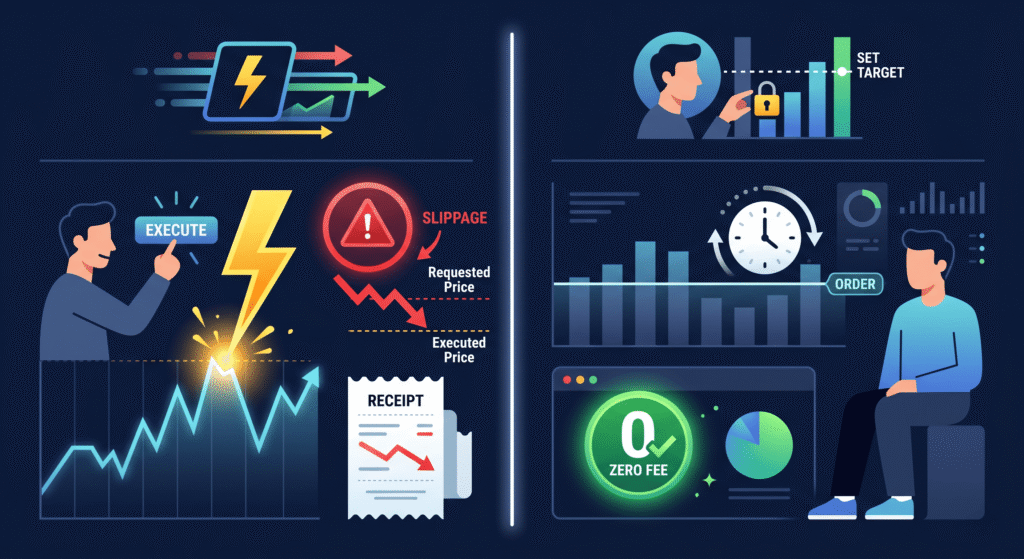
A market order executes immediately at the best available price in the current order book. Use it when news just broke and you need to enter a position right now. Speed is the only advantage.
The danger is slippage. In thin markets with low liquidity, a large market order fills against multiple price levels sequentially. The first $2,000 of your order fills at 55 cents. The next $3,000 fills at 57 cents. The remaining $5,000 fills at 60 cents. Your average entry is 58 cents, not 55. That 3-cent difference on $10,000 is $300 in unnecessary cost before the market even moves.
What a Limit Order Does
A limit order sets an exact price. You place a YES buy at 52 cents. The order sits in the book and waits. It only fills when a seller meets your price.
In 2026, maker fees on Polymarket are often 0%. Furthermore, limit orders within the qualifying spread earn daily USDC liquidity rewards as covered in the Liquidity Mining Guide. You get paid to wait for the right price.
The trade-off is execution certainty. A limit order may never fill if the price moves away from your level. For time-sensitive entries, a limit order slightly above the current ask gives you price control with a higher fill probability than a tight bid.
When to Use Each Order Type
Use a market order when speed matters more than price. Specifically, breaking news events, confirmed resolution signals, or convergence alerts from multiple whale wallets justify market orders despite the slippage risk.
Use a limit order for every planned entry above $500. The 0% maker fee and the reward income from qualifying orders make limit orders superior to market orders in every scenario where timing is not critical.
Reading the Polymarket Order Book
The Bid Side
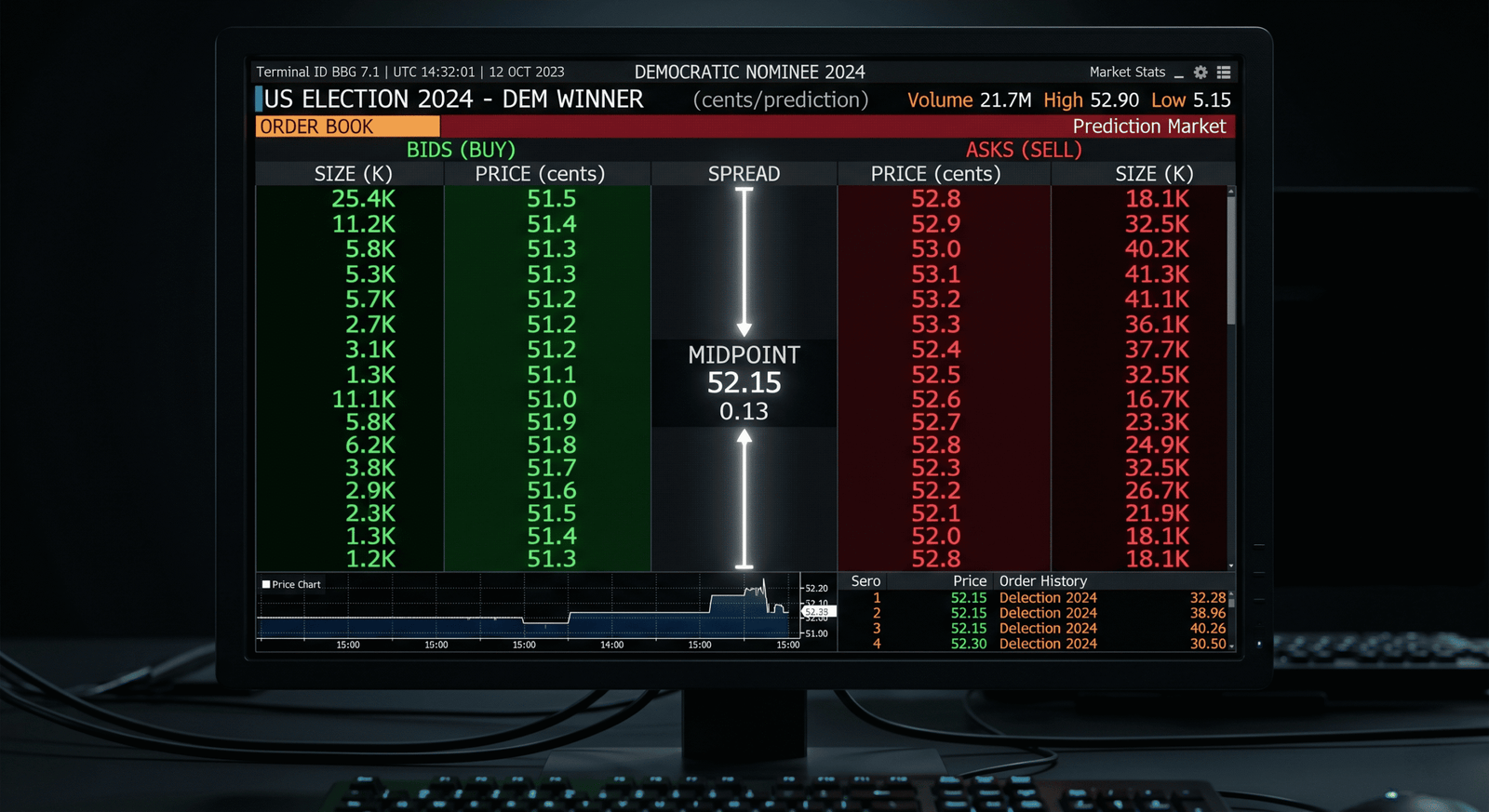
Bids are buy orders. They appear in green. The best bid is the highest price any buyer currently offers. It sits at the top of the green column. A tight best bid close to the midpoint signals strong buying interest and low slippage for market sells.
The Ask Side
Asks are sell orders. They appear in red. The best ask is the lowest price any seller currently accepts. It sits at the top of the red column. A tight best ask close to the midpoint signals strong selling interest and low slippage for market buys.
The Spread
The spread is the gap between the best bid and the best ask. It represents the immediate cost of trading. In 2026, high-volume markets like US Elections and Fed rate decisions carry spreads as tight as $0.001. Thin or newly launched markets carry spreads of $0.03 to $0.10. A wide spread signals low liquidity and high slippage risk for market orders.
The Midpoint Price
The midpoint sits exactly halfway between the best bid and best ask. It represents the market’s current implied probability for the outcome. A midpoint of 44 cents means the market assigns a 44% probability to YES resolving. Furthermore, the midpoint is the reference price for all liquidity reward calculations described in the Liquidity Mining Guide.
Order Book Depth
Depth refers to the total USDC available at each price level. A deep order book has large quantities at the bid and ask. A shallow order book has small quantities. Check depth before placing any order above $1,000. Specifically, if only $2,000 sits at the best ask and you want to buy $8,000, the remaining $6,000 fills at progressively worse prices.
Avoiding the Slippage Trap
How the Slippage Trap Works
The slippage trap catches traders who use market orders in thin markets without checking depth first. Here is the exact mechanism.
You want to buy $10,000 of YES at 50 cents. The order book shows a best ask of 50 cents. You click buy. The book only has $2,000 at 50 cents. Your order fills $2,000 at 50 cents, then $2,500 at 51 cents, then $2,000 at 52 cents, then $3,500 at 53 cents. Your average entry is 51.7 cents. The screen said 50.
In 2026, prediction bots called Pred Bots monitor large incoming orders and front-run them. Specifically, when a large market buy arrives, bots detect the order and place their own asks at higher prices before your order reaches them. Your fill gets progressively worse as the bots extract the price difference from your market order.
Reading the Depth Chart Before Entering
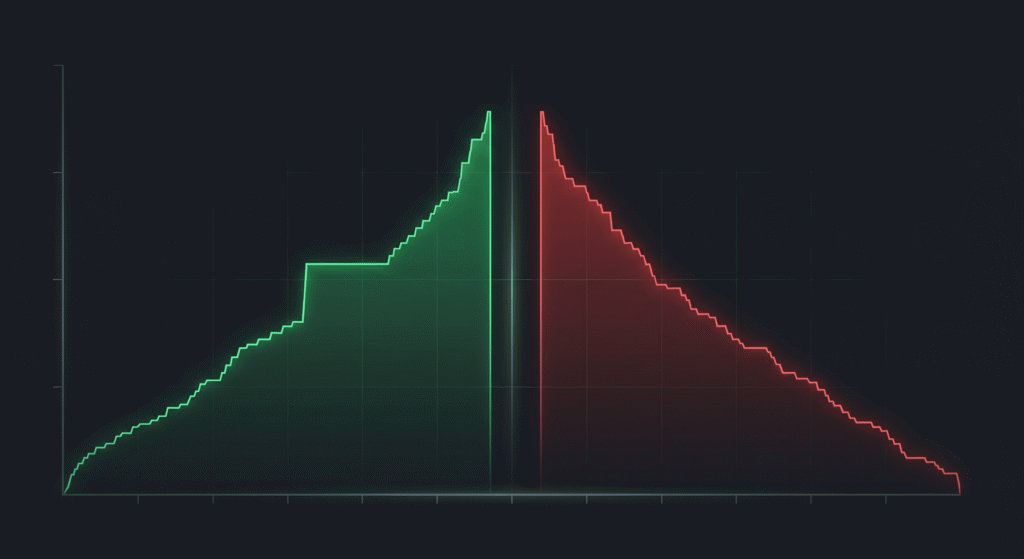
The depth chart is a visual representation of cumulative order book liquidity. The green curve shows total buy orders accumulated at each price below the current midpoint. The red curve shows total sell orders accumulated at each price above the midpoint.
Before placing any order above $500, check the depth chart. Find your intended order size on the green axis. Read across to the price level where that cumulative quantity exists. That price is your realistic fill price, not the best ask displayed on the buy button.
Specifically, if you want to buy $10,000 and the depth chart shows the cumulative ask curve does not reach $10,000 until 53 cents, your market order fills at an average of approximately 52 cents rather than the current best ask of 50 cents. That 2-cent difference is avoidable with a limit order.
The $500 Limit Order Rule
Use a limit order for every transaction above $500. This single rule prevents the slippage trap in the majority of cases.
Place your limit order at the current best ask for immediate fill priority. Alternatively, place it 0.5 to 1 cent above the best ask if you want higher fill certainty on a moving market. The small premium above the best ask costs less than the average slippage from a comparable market order on the same position size.
For orders above $5,000, split the position into two to three separate limit orders placed at incrementally higher prices. Specifically, a $10,000 entry split into a $4,000 order at 50 cents, a $3,500 order at 51 cents, and a $2,500 order at 52 cents avoids a single large order that sweeps through multiple price levels simultaneously. Notice a massive limit order sitting in the book while you are entering? Check our Polymarket Whale Tracking Guide to identify whether it belongs to an insider.
2026 Pro Tips: Latency, Bundling, and Jito
API Latency and the Refresh Rule
Polymarket v2 runs on fast infrastructure, but the UI can lag behind actual on-chain state during high-volume events. Specifically, on election nights, major Fed announcements, and breaking geopolitical events, the price displayed on the Polymarket interface can be 2 to 5 seconds behind the live order book state.
Always refresh the page immediately before clicking confirm on any order during high-activity periods. Specifically, a 2-second refresh before confirming a $5,000 order costs nothing and prevents entering at a price that no longer exists in the live book.
Additionally, avoid relying on cached price displays when the market is moving fast. Open the order book panel directly and verify the current best bid and ask before placing your order. The order book panel refreshes independently of the main market page display and provides a more current price state during peak activity.
Transaction Bundling on Polygon
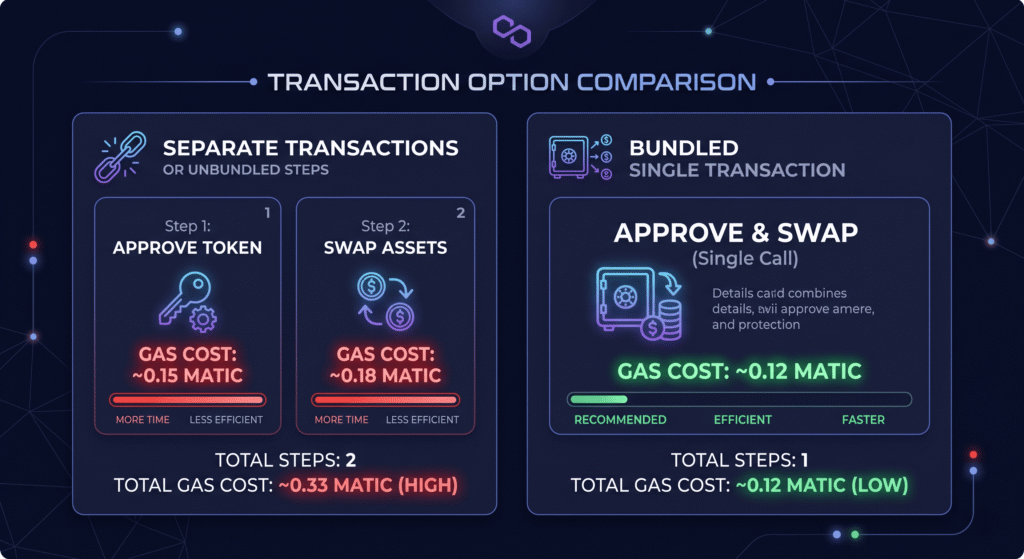
Standard Polymarket trades on Polygon require two separate transactions. The first transaction approves the USDC spend. The second transaction executes the trade. Two transactions mean two gas fees, two confirmation waits, and two points of failure during fast-moving markets.
In 2026, advanced Polymarket interfaces support transaction bundling. Bundling combines the approval and trade execution into a single Polygon transaction. This saves one confirmation round, reduces total gas cost, and removes the risk of the approval confirming while the market moves before the trade executes.
Check whether your current Polymarket interface supports bundled transactions in the settings panel. Specifically, look for a transaction batching or single-transaction approval option. Enabling it before any time-sensitive entry reduces execution latency meaningfully during fast-moving market conditions.
Jito-Style Order Management for Active Traders
Professional traders in 2026 use automated order management scripts to maintain optimal limit order placement without constant manual monitoring. The approach works as follows.
A script monitors the Polymarket CLOB API in real time. When the midpoint shifts by 1 cent or more from your current limit order placement, the script automatically cancels your existing order and places a new one at the updated optimal price. This keeps your orders at the front of the queue at the best price level continuously.
The gas cost of each cancel-and-replace cycle on Polygon is approximately $0.001 to $0.005. Against the slippage savings and reward income from maintaining optimal placement, this cost is negligible. For traders without scripting capability, set a manual price alert at 1-cent midpoint movements using the DropsBot threshold alert as described in the Whale Alerts Setup Guide. The alert triggers a manual order update rather than an automated one, adding 2 to 5 minutes of lag but requiring no technical implementation.
Putting It All Together: Entry Checklist
Before placing any Polymarket order above $500, run through the following five checks in order.
Check the spread first. A spread above 3 cents signals thin liquidity. Switch to a limit order regardless of your planned order type.
Check the depth chart second. Find where your target order size sits on the cumulative ask curve. If the realistic fill price is more than 2 cents above the displayed best ask, split the order.
Choose your order type third. Breaking news justifies a market order. Planned entries require a limit order. The default buy button is a market order and most traders should change it.
Set the limit price fourth. For immediate fills, place at the current best ask. For patient entries, place at the midpoint or below. For liquidity reward qualification, place within 3 cents of the midpoint.
Refresh and confirm fifth. Refresh the page immediately before clicking confirm during high-activity periods. Verify the order book panel shows the price you expect before executing.
Frequently Asked Questions
What is the difference between a market order and a limit order on Polymarket?
A market order executes immediately at the best available price in the current order book. It prioritises speed over price and carries slippage risk in thin markets. A limit order sets a specific price and waits for a seller to meet it. In 2026, limit orders on Polymarket carry 0% maker fees and earn daily USDC liquidity rewards when placed within the qualifying spread. Use market orders only when entry timing is critical. Use limit orders for all planned entries above $500.
What is slippage on Polymarket and how do I avoid it?
Slippage occurs when a market order fills at a worse price than displayed because the order book runs out of liquidity at the initial price level. On Polymarket, a $10,000 market buy in a thin market can fill $2,000 at 50 cents, $3,000 at 52 cents, and $5,000 at 55 cents, producing a 53-cent average entry when the screen showed 50. Avoid slippage by checking the depth chart before entering, splitting large orders into smaller increments, and using limit orders for all transactions above $500.
What does the spread in a Polymarket order book tell me?
The spread is the gap between the best bid and the best ask. A tight spread of $0.001 signals deep liquidity, low slippage risk, and active market making. A wide spread of $0.05 or more signals thin liquidity, high slippage risk for market orders, and potentially higher reward yields for limit order providers. In 2026, high-volume Polymarket markets like US Elections and Fed rate decisions carry spreads as tight as $0.001. Newly launched or low-activity markets carry spreads of $0.03 to $0.10.
What is the midpoint price on Polymarket?
The midpoint price is the exact center between the current best bid and best ask. It represents the market’s current implied probability for the outcome. A midpoint of 44 cents signals a 44% implied probability of YES resolving. The midpoint also serves as the reference price for all Polymarket liquidity reward calculations. Orders placed within 3 cents of the midpoint qualify for USDC reward payments under the 2026 liquidity incentive program.
Why should I refresh before confirming a Polymarket trade?
The Polymarket user interface can lag behind the live on-chain order book state by 2 to 5 seconds during high-volume events. This means the price shown on the buy button may no longer exist in the actual order book when you click confirm. Refreshing immediately before confirming any order during active market periods ensures you see the current live price state rather than a cached display. This is particularly important during election nights, major Fed announcements, and breaking geopolitical events when prices move fastest.
What is transaction bundling on Polymarket?
Transaction bundling combines the USDC spend approval and the trade execution into a single Polygon transaction instead of two separate ones. Standard Polymarket trades require an approval transaction followed by a trade transaction, which means two gas fees and two confirmation waits. Bundled transactions halve the gas cost, reduce confirmation latency, and remove the risk of the approval confirming while the market price moves before the trade executes. Check the advanced settings panel in your Polymarket interface for a transaction batching or single-transaction approval option.
Keep Reading on CoinTrenches
Polymarket Liquidity Mining Guide 2026: Earn Without Winning Bets — learn how to earn daily USDC rewards by placing the limit orders described in this guide
Real-Time Polymarket Whale Alerts: Full Setup Guide 2026 — build the alert system that tells you when a large limit order in the book belongs to an insider
How to Find Polymarket Whales on Polygonscan: Full Guide 2026 — identify who placed that large order book position before you decide to copy or fade it
Copy-Trading Polymarket Whales: When to Follow and When to Fade — the strategy guide for acting on the order book signals you now know how to read
Theo4 Polymarket: $22M Profit, 14 Bets, $19 in Losses — the all-time profit leader whose entry timing and order placement discipline is the benchmark for every strategy in this guide